

Overview
To improve user setup we’ve created a new rights and roles system. This system allows for the creation of custom roles by assigning specific rights to each created role. Once the roles have been setup, each user can have one or more roles granted to them. This will help understand what each user has access to and make updates easier since any updates to a role will be applied to all users with that role assigned.
Setup (Client Administrators only)
Role creation
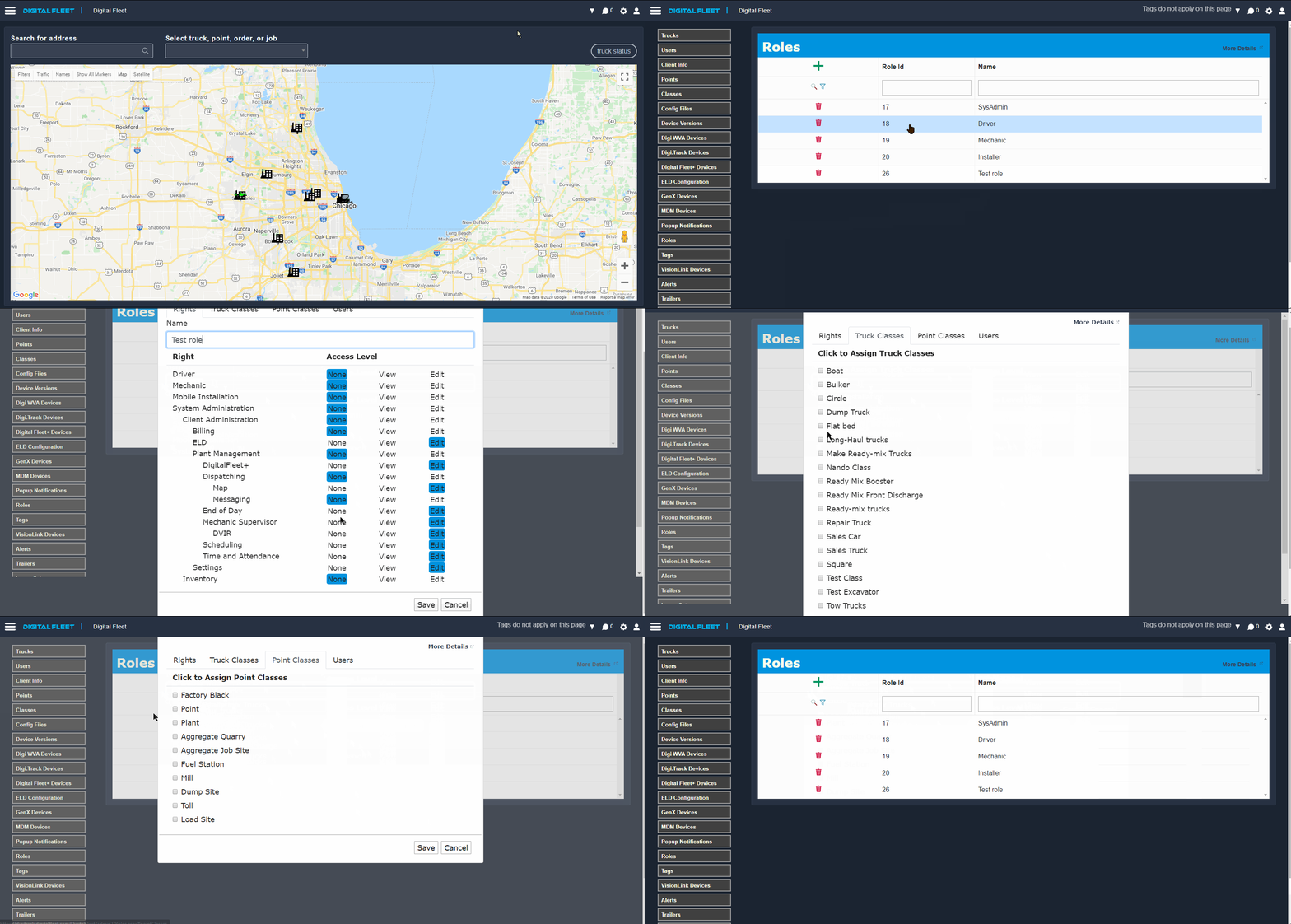
- Access Settings page through the
 icon.
icon. - Select Roles option.
- Select
 button to add a new role or select an existing role to edit it.
 - Specify the name for the role.
- Assign specific rights to a role by selecting the view or edit buttons.
- Some rights automatically include access to lower level rights. For example the Client Administration right also gives access to the Billing, ELD, Plant Management, and Settings rights.
- Specify truck and point classes the role can view.
- If no truck or point classes are selected, the role will not have access to any trucks or points.
- Reports
- By default the selected rights will include the reports listed in the rights access definition table below. To overwrite the default selections for a Role, select the Reports tab and configure the reports as desired.
User assignment
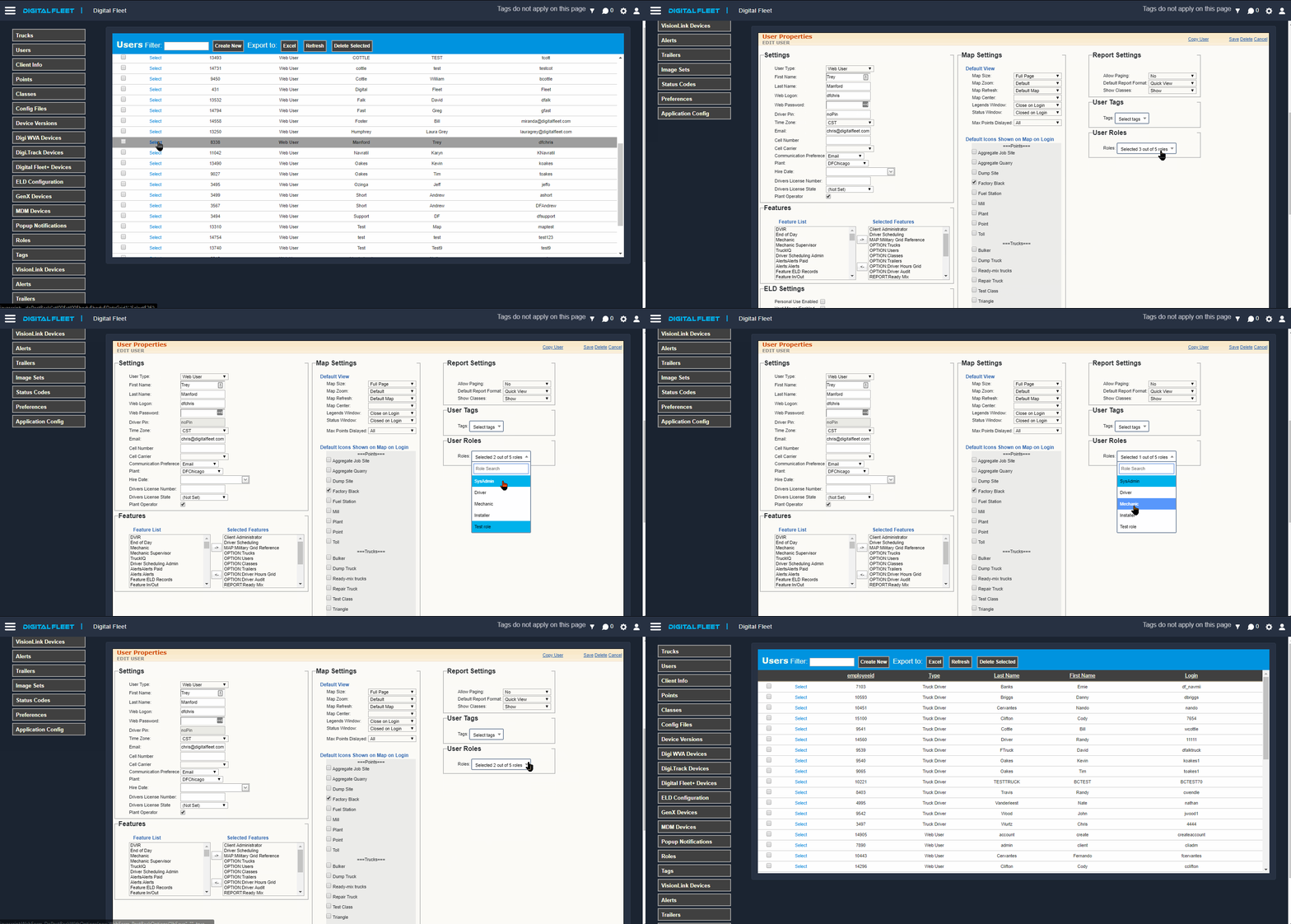
- Select a user
- Assign desired roles under the User Roles drop down
Right access definitions
This section is a description of features and reports each right provides for a user.
Client Administration
|
Also includes the following rights: |
|
| Reports: |
|
| Web Access: |
|
| Driver App: | None |
Hardware Dashboard
|
Also includes the following rights: |
None |
| Reports: | None |
| Web Access: |
|
| Driver App: | None |
Billing
|
Also includes the following rights: |
None |
| Reports: |
|
| Web Access: |
None |
| Driver App: | None |
ELD
|
Also includes the following rights: |
None |
| Reports: |
|
| Web Access: |
|
| Driver App: | None |
Plant Management
|
Also includes the following rights: |
|
| Reports: |
|
| Web Access: |
|
| Driver App: | None |
End of Day
|
Also includes the following rights: |
None |
| Reports: | None |
| Web Access: |
|
| Driver App: | None |
Time Clock
|
Also includes the following rights: |
None |
| Reports: | None |
| Web Access: |
|
| Driver App: | None |
Digital Fleet+
|
Also includes the following rights: |
None |
| Reports: |
|
| Web Access: |
|
| Driver App: | None |
Dispatching
|
Also includes the following rights: |
|
| Reports: |
|
| Web Access: |
|
| Driver App: | None |
Map
|
Also includes the following rights: |
None |
| Reports: |
None |
| Web Access: |
|
| Driver App: | None |
Messaging
|
Also includes the following rights: |
None |
| Reports: | None |
| Web Access: |
|
| Driver App: | None |
Mechanic Supervisor
|
Also includes the following rights: |
|
| Reports: |
|
| Web Access: |
|
| Driver App: | None |
DVIR
|
Also includes the following rights: |
None |
| Reports: |
|
| Web Access: |
|
| Driver App: | None |
Scheduling
|
Also includes the following rights: |
None |
| Reports: |
|
| Web Access: |
|
| Driver App: | None |
Time and Attendance
|
Also includes the following rights: |
None |
| Reports: |
|
| Web Access: |
None |
| Driver App: | None |
Settings
|
Also includes the following rights: |
None |
| Reports: |
|
| Web Access: |
|
| Driver App: | None |
Driver
|
Also includes the following rights: |
None |
| Reports: | None |
| Web Access: |
None |
| Driver App: |
|
Mechanic
|
Also includes the following rights: |
None |
| Reports: |
|
| Web Access: |
|
| Driver App: | None |
Mobile Installation
|
Also includes the following rights: |
None |
| Reports: | None |
| Web Access: |
None |
| Driver App: | None |
| Digital Fleet+ Installer App: |
|
Comments
0 comments
Article is closed for comments.